server-side attacks or what happens if you trusting user input
everyone has heard the word server at some point. usually when something breaks. “the servers are down!” — a timeless classic. either during your favorite game or exactly when you really need something to work. but what is a server, actually?
a server can be hardware or software. at its core, it’s just a service provider: it offers programs, functions, or data so that other devices or programs — called clients — can access them. most of the time, this happens over a network. very often over the internet. a simple example: you visit a website, enter two numbers, and get a result back. the calculation doesn’t necessarily happen in your browser. instead, your browser sends the input to a server, the server does the math, and sends the result back. magic? no. http. if a server is exposed to the public internet, it must be properly secured. otherwise, a successful attack can lead to things leaking that really shouldn’t: passwords, banking details, personal information — the full data breach bingo card. that’s exactly what my last module on htb academy was about: server-side attacks. what kinds exist, how they work, and how to spot or prevent them. spoiler: i learned a lot. and almost lost my sanity along the way.
basics (aka: the server does not always behave)
the module introduces four types of server-side attacks. here’s the nerd-friendly short version:- server-side request forgery (ssrf)
- server-side template injection (ssti)
- server-side includes (ssi) injection
- xslt server-side injection
with ssrf, an attacker tricks a web application into making http requests on their behalf — requests it really shouldn’t make. this usually happens when user input is blindly trusted to build requests. in the worst case, this allows access to internal services hidden behind firewalls. firewall says no, web app says yes.
ssti abuses a web application’s template engine. if user input is rendered directly inside templates, bad things can happen. data leaks, code execution — templates are powerful, and power without validation is dangerous.
ssi allows web servers to dynamically include content in html pages. convenient — until someone starts injecting their own ssi directives. the result can range from data exposure to remote code execution. yes, even html can be scary.
xslt is used to transform xml documents into other formats. sounds harmless. it isn’t. if attackers can influence xslt processing, they may be able to make the server execute unintended — and very unwanted — code. xml is patient. servers are trusting.
details, more headaches
to make sure this isn’t just theory, the module goes into detail and demonstrates how these attacks actually work. ssrf, for example, often occurs when a web application fetches internal or external resources based on user input without proper validation. attackers can then craft requests that reach internal endpoints that were never meant to be exposed. ssti is a bit more advanced. here, the server’s template engine itself becomes the attack surface. misconfigurations or insecure implementations can allow attackers to read sensitive data or even execute commands on the server. after many chapters, there are hands-on exercises where you can try everything yourself. great for understanding. also great for realizing how much you still don’t know. at the end, there’s the skill assessment. you’re dropped into a realistic scenario and expected to apply everything you’ve learned. it can get tricky. sometimes the only solution is: try, fail, swear quietly, drink coffee, try again. premium brain workout.
error of doom — or: read the damn request
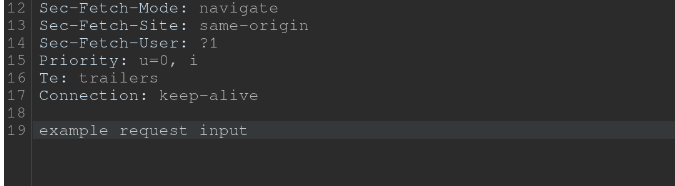
as promised, here’s how i almost failed the module. spoiler: it was my fault. during the assessment, burp suite was used. intercepting, modifying, and replaying requests — all standard stuff. or so i thought. no matter what i did, i kept getting errors like bad request. constantly. for days. i was dangerously close to blaming burp itself. so i looked up a walkthrough. and guess what? my requests were basically correct. parameters matched. structure matched. everything looked fine. until i inspected my requests very carefully. some of them had extra blank lines at the end. others didn’t. and that was the entire problem. the requests without those extra lines worked. the others didn’t. i simply didn’t know that, in this case, properly terminating the request — down to the last line break — actually mattered. protocol-level details are not decoration.
so here’s my final piece of advice:
if burp suite behaves strangely in the repeater, inspect your request all the way to the very last line. sometimes the bug isn’t in the payload — it’s in the line break.
pictures
request with lines at the end
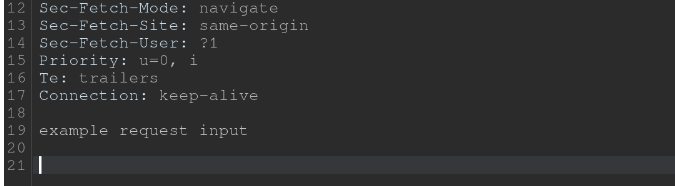
request without lines at the end..this works